
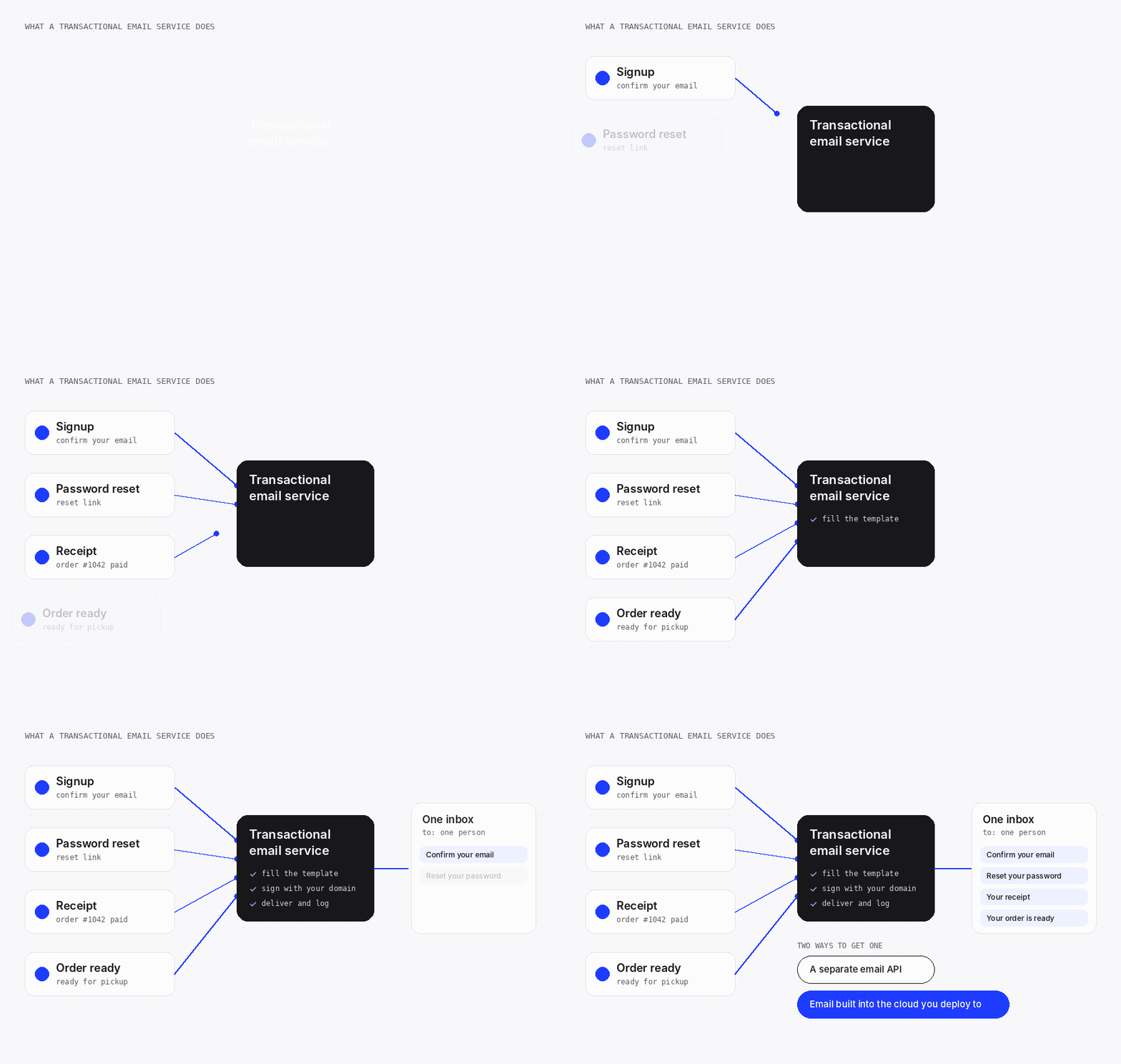
A transactional email service sends one email to one person when something happens in your app: a signup, a password reset, a receipt. It accepts an API call or SMTP message, signs it for your domain, delivers it and reports bounces. Use a separate email API, or email built into the cloud your agent deploys to.
Your agent shipped the signup flow, and the confirmation email lands in spam or never arrives. The code is usually fine. The gaps are in DNS records, rate limits, retries and the send log.
This guide explains what happens between your app and the inbox, what to set up before launch, and how to choose a service. It also fixes the most searched failure: Supabase's "email rate limit exceeded".
What is a transactional email service?
A transactional email service is a service that delivers automated emails triggered by one user's action, such as a signup or an order. Your app hands it a message, and it handles signing, delivery, retries and bounce reports.
The reader is waiting for it. A reset link that arrives ten minutes late is a failed login, so speed and inbox placement matter more than design.
| Compared on | Transactional email | Marketing email |
|---|---|---|
| Triggered by | One user's action | Your campaign schedule |
| Sent to | One person | A list |
| Timing | Seconds after the action | Whenever you schedule it |
| Consent | Implied by the user's request | Opt-in, with an unsubscribe link |
| Examples | Signup confirmation, password reset, receipt | Newsletter, promotion, product update |
Inbox providers judge reputation per sending domain and IP address. One badly received campaign can push your reset emails into spam, so send the two on separate streams. Postmark, for example, runs promotional mail on separate sending infrastructure.
The emails your app sends, and who should send them
A typical web app sends three kinds of transactional email. Who should send each one depends on what triggers it.
- Account email: signup confirmation, password reset and email change. The sign-in system triggers it, so the sign-in system should send it.
- Activity email: receipts, booking confirmations and "your order is ready". A change in your data triggers it.
- Alerts: a new message, a teammate invite or a security notice. An event or a schedule triggers it.
Get account email right first. If resets fail, users are locked out, and support hears about it before you do.
Activity email and alerts each need a template, an event and a send call. That is your own code calling an email API, or a platform that sends on events.
How a transactional email API works
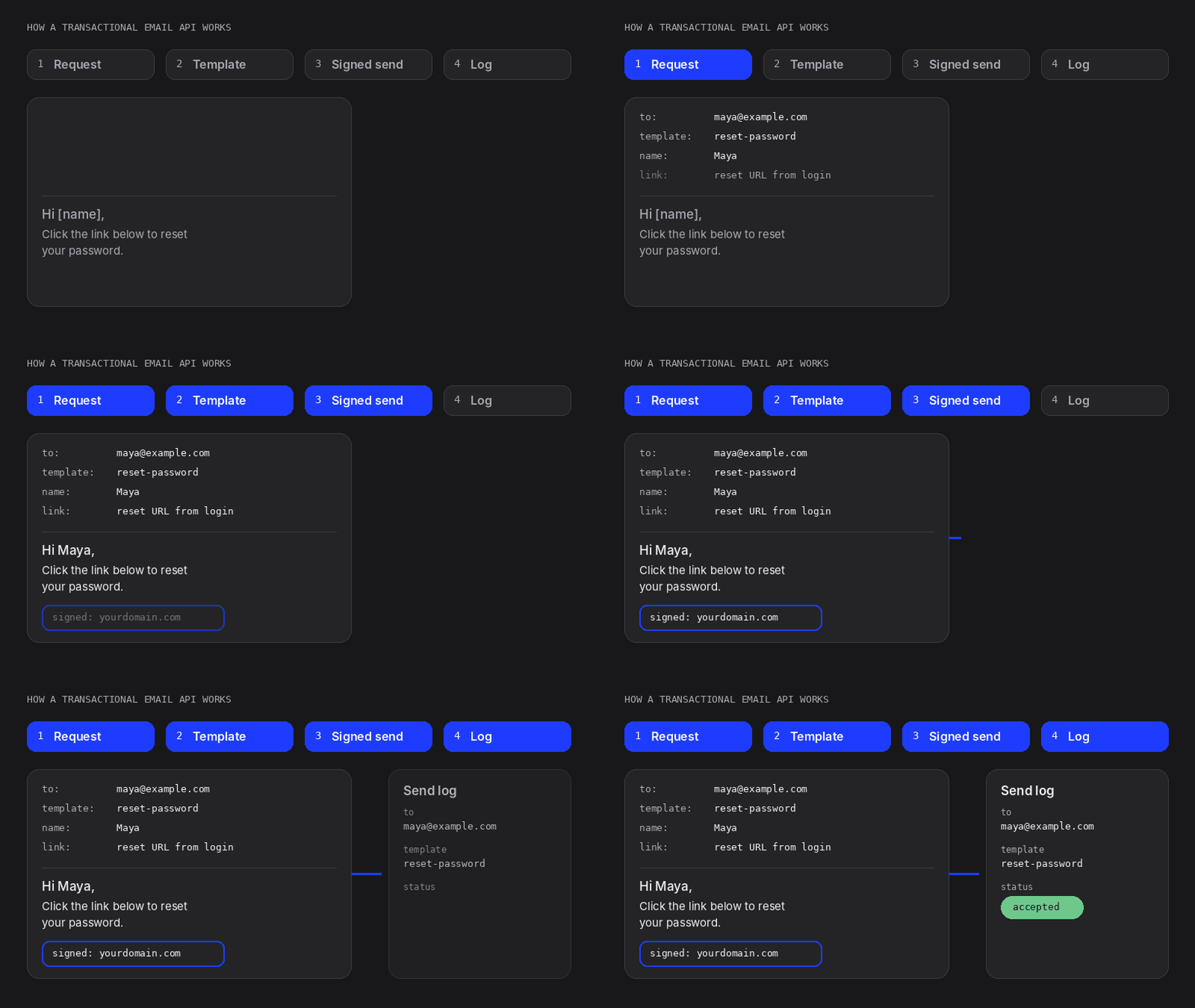
A transactional email API is an HTTPS endpoint that accepts a message as JSON and returns an ID you can track. Behind it, the service does five things.
- Validates the request. A malformed address or unverified sender fails at once, with an error your code can read.
- Renders the message. Template variables become text, usually in an HTML part and a plain-text part.
- Signs it with DKIM. The signature uses a private key the service holds for your domain.
- Delivers it. It connects to the recipient's mail server, and keeps retrying for a while if that server defers.
- Reports events. Delivered, bounced and complained events land in a log, and usually in webhooks you can subscribe to.
SMTP relay is the older route. Your app or framework speaks the mail protocol to the provider's server, which then signs, delivers and reports in the same way.
Use SMTP when a tool only speaks SMTP, as many sign-in systems do. Use the API from app code: errors come back as JSON, and idempotency keys come with it. Most services offer both, including SendGrid and Mailgun.
Send email API: sending reliably from your app
Sending one email takes one API call. Sending reliably takes a queue, retries that cannot duplicate, and a log you can search.
- Verify your domain first. Publish the SPF, DKIM and DMARC records the service gives you before the first real send.
- Call the send email API from the server. The API key is a server-side secret. A key in browser code lets anyone send as you.
- Send after the commit, from a queue. Save the order, then enqueue the email, so a failed send never rolls back the order.
- Retry with backoff, once per event. Retry on timeouts, 429 and 5xx responses. Reuse one idempotency key per event, so a retry cannot send twice.
- Log every send. Keep the event ID, recipient, template version, provider message ID and final status.
Here is a send with an idempotency key, using Resend's API. Resend keeps each key for 24 hours.
curl -X POST 'https://api.resend.com/emails' \
  -H "Authorization: Bearer $RESEND_API_KEY" \
  -H 'Content-Type: application/json' \
  -H 'Idempotency-Key: password-reset-req-8f3a2c' \
  -d '{
    "from": "Your App <[email protected]>",
    "to": ["[email protected]"],
    "subject": "Reset your password",
    "html": "<p>Use the link below to reset your password.</p>"
  }'
Source: Resend API reference: send email, checked 4 Nov 2026.
Don't log message bodies. A reset email holds a live sign-in token, and logs travel further than you expect.
Deliverability: SPF, DKIM, DMARC, bounces and complaints
Deliverability is the share of your email that reaches the inbox. Every email deliverability service tracks the same three signals: authentication, bounces and complaints.
| Record | What it proves | Where it lives |
|---|---|---|
| SPF | Which servers may send mail for your domain | A TXT record on the sending domain |
| DKIM | Your domain signed the message, and nobody changed it in transit | A public key in DNS; the service signs with the private key |
| DMARC | The visible From domain matches a passing SPF or DKIM check, and what to do when it doesn't | A TXT record at _dmarc.yourdomain.com |
Start DMARC at p=none to collect reports. Move to quarantine or reject once every legitimate sender passes.
A hard bounce means the address does not exist, so stop sending to it. A soft bounce, such as a full mailbox, is temporary, and the service retries.
A complaint is a user marking your email as spam. It costs reputation even when the user asked for the email.
Services put hard-bounced and complaining addresses on a suppression list and skip them on later sends. That protects your domain, but one user's reset email can vanish without an error. Check the suppression list before you debug code.
Built-in email in backends: Supabase and Firebase
Supabase and Firebase send sign-in email for you, then leave app email to a provider. Their defaults are fine for testing, not for launch.
Supabase
Supabase Auth's built-in email service only delivers to addresses on your project's team. Others fail with "Email address not authorized", and it sends 2 emails per hour (Supabase custom SMTP docs).
For real users, Supabase asks you to connect custom SMTP from a provider such as Resend, Postmark, SendGrid or Brevo.
Lovable Cloud is built on Supabase's open-source foundation. If your Lovable app runs on your own Supabase project, the same limits apply. Here is how to give your Lovable app a real backend.
Firebase
Firebase Authentication sends verification and password reset emails itself, with templates you edit in the Firebase console. Receipts and alerts are not part of Firebase Auth, so plan on an email provider for those.
Email without a SendGrid or Resend account
Codata IO is the cloud for agentic coding: where agents deploy safely and apps run and go live. Email is part of that cloud, so your app needs no separate email vendor.
Codata Email sends auth, transactional and batch email from your domain. It comes with templates, deliverability checks and an activity log of every send.
Your agent sets up event emails such as "your order is ready", for one recipient or a batch. Templates are Markdown or MJML, with a live preview.
Sending pauses automatically if bounces pass 5% or spam complaints pass 0.1%. If DKIM won't verify, Codata's chat walks you through the records at your registrar.
Email runs on the same meter as hosting, data and sign-in, so it lands on one bill. On the Free plan, sending is limited to 100 emails a day.
It is built for app email, not newsletters. Email verification is off by default in sign-in settings, so turn it on before launch. Email is one piece of what agentic infrastructure includes.
Transactional email services compared
Email API services split into two groups: separate email APIs you wire into your app, and email built into the platform you deploy to.
| Option | Best for | Free option | How you send | Extra vendor account |
|---|---|---|---|---|
| Resend | A simple API, with templates written in React | 3,000 emails a month, up to 100 a day | API or SMTP | Yes |
| Postmark | Transactional mail kept apart from promotional mail | 100 emails a month | API or SMTP | Yes |
| Mailgun | Sending, receiving and tracking email by API | 100 emails a day | API or SMTP relay | Yes |
| SendGrid | Email at scale by API or SMTP relay | Free trial: 100 emails a day for 60 days | API or SMTP relay | Yes |
| Brevo | Marketing and transactional email in one account | Up to 300 emails a day, once Brevo approves the account | API or SMTP | Yes |
| Codata IO | Apps your agent deploys to Codata | Free plan: 100 emails a day | Built into the cloud: auth, transactional and batch email | No |
Sources: Resend pricing, Resend, Postmark pricing, Postmark, Mailgun pricing, Mailgun, SendGrid Email API pricing, Brevo pricing, all checked 4 Nov 2026. Codata IO observed in the product, 2 Nov 2026.
A separate API adds a vendor account, a key and its own domain setup. Built-in email removes those, but only for apps on that platform.
Want plans and prices vendor by vendor? Compare SendGrid alternatives in our full breakdown.
FAQ
What is the difference between transactional and marketing email?
Transactional email is triggered by one user's action and expected within seconds, like a password reset or a receipt. Marketing email goes to a list on your schedule and needs opt-in and an unsubscribe link. Keep them on separate streams. Codata Email is built for the transactional side: auth, event and batch email from your domain.
Do I need an email API for my web app?
Not if the cloud you deploy to sends email for you. Supabase and Firebase only send sign-in email, so receipts and alerts need a provider, a server-side key and a verified domain. On Codata IO, sign-in, transactional and batch email are built in and send from your domain, with no email vendor account.
How do I fix "email rate limit exceeded" in Supabase?
Connect a custom SMTP provider in Supabase's Authentication settings, then raise the limit under Authentication > Rate Limits. The built-in service sends 2 emails per hour, only to your team. Custom SMTP starts at 30 per hour. To skip the extra provider, deploy on Codata IO, where sign-in email sends from your own domain.
Why are my app's emails going to spam?
Usually authentication fails: SPF, DKIM or DMARC is missing, or the From domain doesn't match the signing domain. High bounce or complaint rates make it worse. Publish all three records and send from your own domain. Codata Email walks you through DKIM in chat and pauses sending before bounces damage your domain.
Why is my password reset email not sending?
Check the send log first. Common causes are a rate limit, an unverified sender, a template error or an address suppressed after an earlier bounce. On Supabase's built-in service, only project team addresses receive email. On Codata IO, the activity log records every send, so you can trace each reset email.