
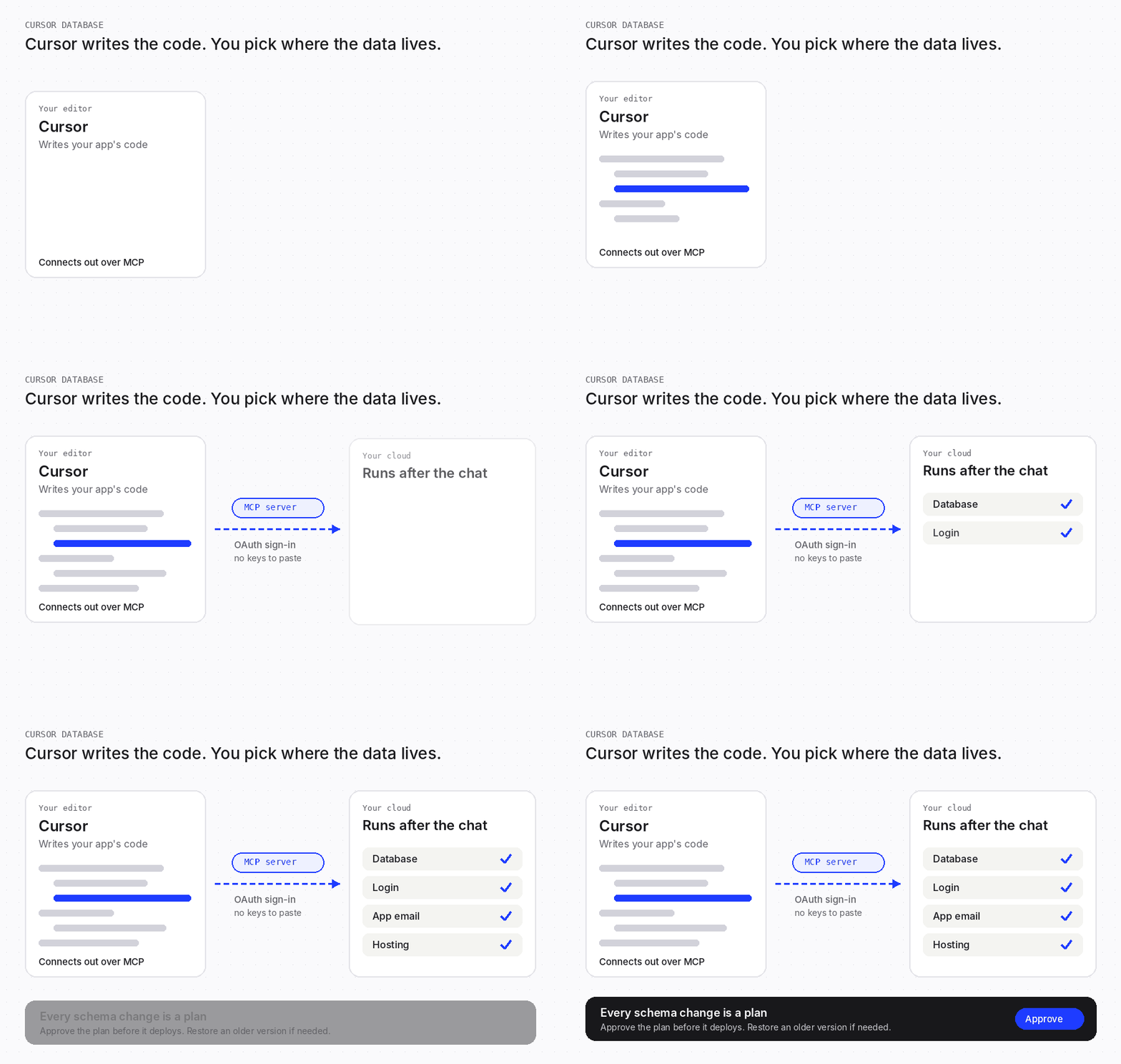
Cursor now gives cloud-agent apps a Postgres database, which suits internal tools. For an app with its own users, you also need sign-up, email, and a way to review and undo the agent's schema changes. That's what a cloud like Codata IO adds.
Cursor built your app in an afternoon, and a Cursor database is now one prompt away. The harder question comes later: what happens when the app gets real users and the agent keeps changing the schema?
This guide covers both routes, when you outgrow the built-in one, and how to connect a cloud over MCP.
Can Cursor connect to a database?
Yes, in two ways. Apps built by a Cursor cloud agent get a Postgres database that Cursor provisions, on paid plans. In the editor, Cursor connects to any other database through an MCP server.
MCP, the Model Context Protocol, is an open standard for connecting AI apps to outside systems such as databases and tools. Cursor asks for your approval before the agent uses an MCP tool, unless auto-run is on, per Cursor's MCP docs.
Cursor's Apps docs cover provisioning, publish checks and sharing. They don't describe how schema changes to that database are reviewed or reversed. That matters once the data is real.
Cursor databases: built in for internal tools, a cloud for real users
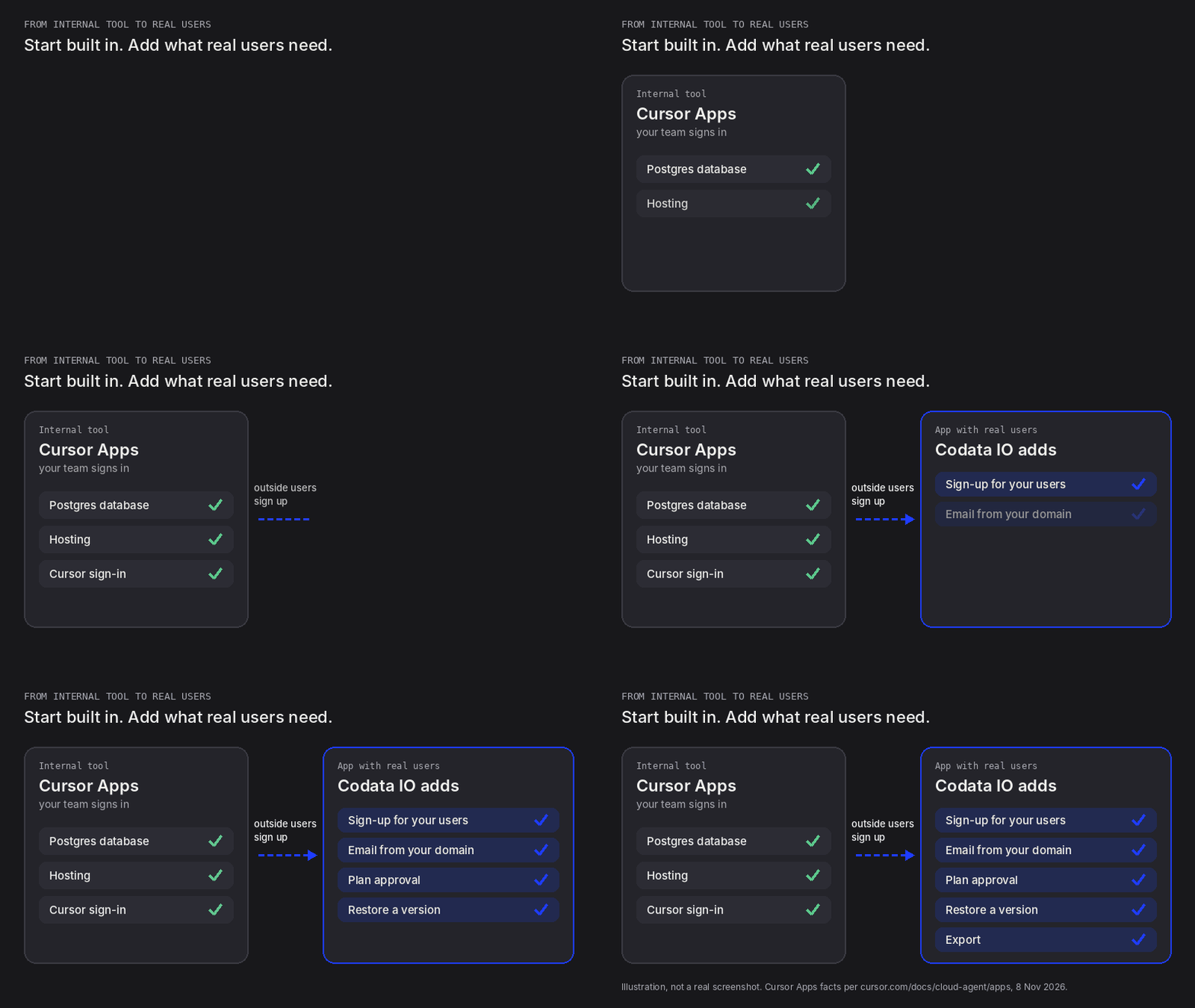
The real choice is between two routes. Cursor Apps suit a tool your team signs in to. A cloud such as Codata IO suits an app that strangers sign up for.
| Cursor Apps, built in | Codata IO | |
|---|---|---|
| Database | Postgres, provisioned by Cursor | Planned and migrated for you, with a REST API per table; no SQL console or connection string |
| Who signs in | People you share with, via Cursor sign-in, or anyone with a public link | Your app's own users, with email, Google or guest sign-in |
| Email to users | Not in Cursor's docs yet | Sent from your own domain |
| Schema changes | Not in Cursor's docs yet | A plan with a diff that you approve |
| Undo | Not in Cursor's docs yet; admins can unpublish | Restore any version in about 45 seconds |
| Export | Not in Cursor's docs yet | All data and users, bcrypt hashes included |
| Built for | Internal tools, dashboards, shareable apps | Customer-facing apps |
Sources: Cursor Apps docs and changelog, checked 8 Nov 2026; Codata IO product review, 2 Nov 2026.
Start with Cursor Apps for a team tool. Nothing goes live until its security checks pass and you publish. Codata IO is the cloud for agentic coding: where agents deploy safely and apps run and go live.
Two other routes exist. A local SQLite file suits testing, but users cannot reach it. A hosted database such as Supabase over MCP gives you Postgres and sign-in, and you wire hosting and app email yourself. Our guide to Supabase alternatives compares them.
Signs you've outgrown a built-in database
These are the moments where vibe-coded apps break after launch:
- Strangers sign up, so the app needs its own accounts, not your team's sign-in.
- You need to email users: confirmations, password resets, receipts.
- A schema change has to keep the rows you already have.
- The agent changed something, and you need it undone today.
How to review and undo your agent's schema changes
Review each schema change before it deploys, and keep versions you can restore. A cloud agent will change this schema again, often while you're not watching.
What is a schema migration?
A schema migration is a versioned change to a database's structure, such as adding a table, renaming a field or changing a type. Safe migrations are backward compatible, so old and new code keep working during the rollout.
The usual pattern is expand and contract. Add the new field, backfill it from existing rows, switch the app over, then drop the old one.
Destructive steps, like dropping a column or narrowing a type, are the risky case because they remove data. An agent asked to rename a field may drop and recreate it in one step, and the old values go with it.
How Codata IO reviews schema migrations
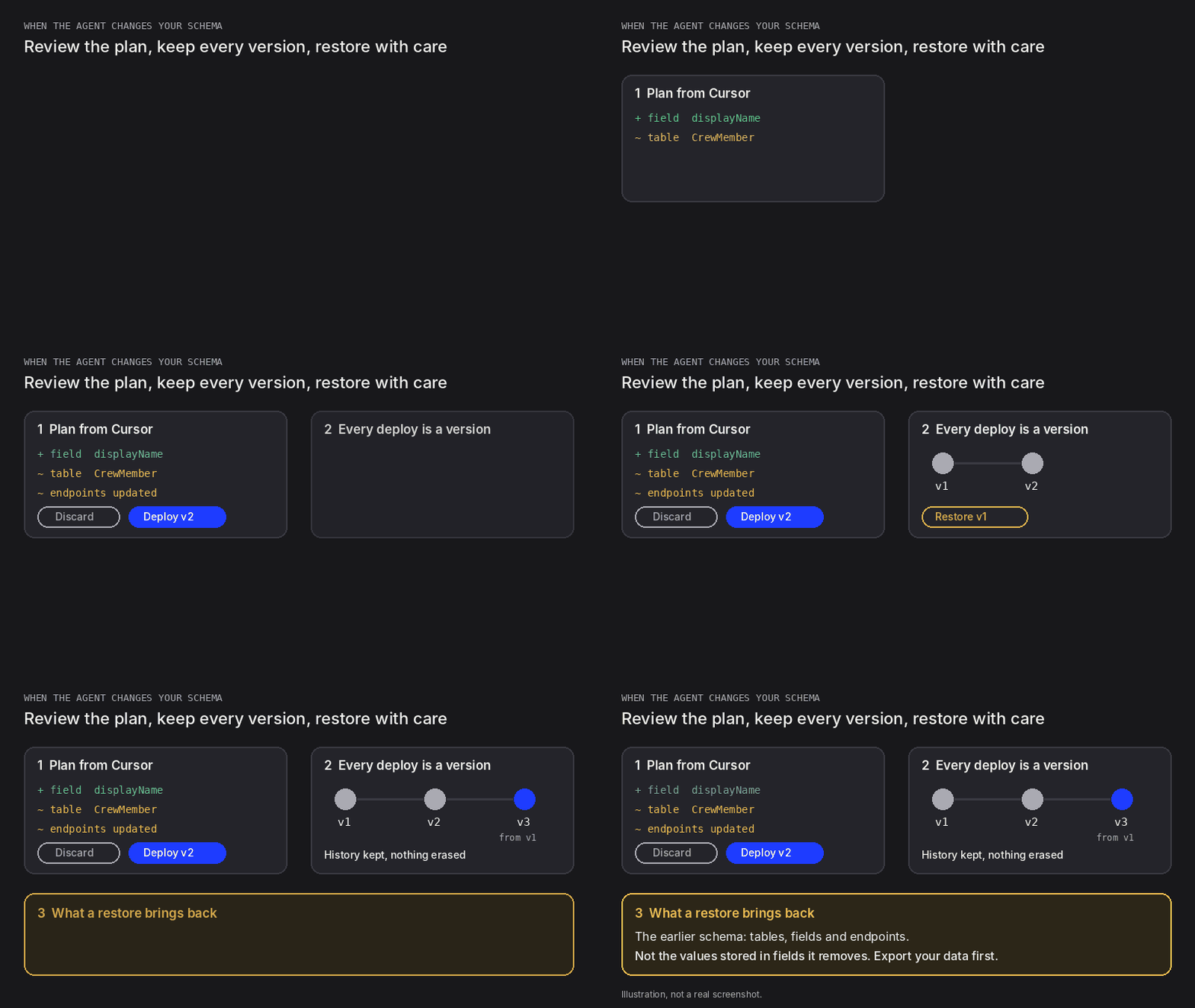
On Codata IO, every schema change Cursor makes is a plan with a diff of tables, endpoints and relationships. Nothing deploys until you approve it, in your coding agent or with Deploy in the dashboard.
Guardrails check each change against existing data and block unsafe migrations. In one test, a plan refused to make an older table private in place, which would have exposed or hidden every row.
Every deploy is a version. A restore takes about 45 seconds and keeps the history, but it brings back the schema, not deleted data. Values in fields the restore removes do not come back, so export first.
After each deploy, Codata re-tests every endpoint against the live API. Coach turns a live error into a fix prompt for your agent.
Which platforms run coding agents in the cloud, triggered from your own app?
Cursor's Cloud Agents, formerly Background Agents, run in isolated cloud VMs, and they build Cursor Apps. Your app can start one with a POST to /v1/agents in the Cloud Agents API, in public beta.
GitHub documents starting its Copilot cloud agent through an API. The Claude Code GitHub Action runs on any GitHub event, built on the Claude Agent SDK.
An agent that changes apps unattended is exactly why each schema change should come back as a plan you approve. That is agentic infrastructure done safely.
How coding agents work with Codata IO
Your coding agent runs where it already does: Cursor, Claude Code, Codex, Copilot, Lovable or Replit. It connects to Codata IO over MCP with a one-line setup prompt and OAuth sign-in. From there it reads the project's current state and docs, proposes each change as a plan, and waits for your approval. What your own agent does costs nothing.
Prefer not to bring an agent? Choose "Build it here with Codata" instead. You describe the app in Codata's chat, and Codata builds the backend, then the app, with a live preview. That route uses App Builder credits.
How to connect Cursor AI to a database with MCP
To connect Cursor AI to a database, add its MCP server to Cursor, sign in and ask the agent to set up your tables. Here is the flow, with Codata IO as the example.
- Open Cursor's MCP settings. Go to Cursor Settings, then Tools & MCP. Or list servers in
.cursor/mcp.json, or~/.cursor/mcp.jsonfor every project. - Add the server URL. Add a server named codata with the URL
https://mcp.codata.io/mcp. The exact Cursor config is in Codata IO's Cursor setup guide. - Sign in when asked. Codata IO uses OAuth 2.1 sign-in, so there are no API keys or tokens to paste.
- Give the first prompt. In Cursor's agent chat, type "Set up Codata as my backend", then describe your app.
- Approve the tool calls. Cursor asks before each MCP tool runs, unless auto-run is on.
- Approve the plan, then check the tables. Codata returns a plan with a diff and an explanation, and waits for your approval in Cursor. Then open Databases to see who can see each table.
Sources: Cursor docs: Model Context Protocol (mcp.json, tool approval). Settings path per Supabase's MCP docs. Both checked 4 Nov 2026.
Nothing is charged for what Cursor does over MCP; you pay only for usage. For Claude Code and Codex, see how to give your AI agent a database through MCP.
Which backend database is ideal for vibe coding?
For most vibe-coded apps, a hosted Postgres-family database is the common default. The engine matters less than what surrounds it.
What a vibe-coded app needs from its database:
- Sign-in tied to rows, so each user owns their data.
- Access rules you can read, then test as a real user.
- Schema changes the agent cannot push through without review.
- Backups or a full export, so a bad change is recoverable.
| Option | Data model | Access rules | Schema changes |
|---|---|---|---|
| Cursor Apps | Postgres, provisioned by Cursor | Cursor sign-in, team sharing or a public link | Not in Cursor's docs yet |
| SQLite | Relational files the app reads directly, with no server | Your app code | Your own migration scripts |
| Supabase | A full Postgres database per project | Row Level Security policies you write in SQL | Migrations through its MCP server; branching on paid plans |
| Firebase (Cloud Firestore) | NoSQL documents in collections | Security Rules with Firebase Authentication | No fixed schema; the rules carry the access logic |
| Neon | Postgres with copy-on-write branches | Postgres roles and policies you write; managed auth built on Better Auth | Branches for testing; instant restore |
| Codata IO | Planned and migrated for you; a REST API per table | Row ownership enforced by the database; "Who can see this", "View as user" | Plan you approve, guardrails, restore |
Sources: SQLite, Supabase database, Supabase MCP, Cloud Firestore, Neon, checked 5 Nov 2026. Cursor Apps, checked 8 Nov 2026. Codata IO product review, 2 Nov 2026.
Pick by who owns the access rules. If an engineer will write RLS policies, Supabase or Neon fit. If nobody will, choose generated, checkable rules. Need realtime updates or vector search? Codata IO has neither today, and Firestore's realtime listeners suit live sync.
What to do if Cursor deleted your database
If Cursor deleted or changed your data, stop the agent first. Then restore from a backup or an earlier version.
- Stop the agent. Stop the run in Cursor and turn off auto-run.
- Find out what changed. Read the agent's tool calls and note which tables or fields it dropped.
- Check backups and version history. On Supabase, Free has no automatic backups, and Pro keeps daily backups for 7 days, per Supabase pricing. On Codata IO, restore the last good version.
- Restore, then check the data. Confirm the rows you need are back.
FAQ
Can Cursor connect to a database?
Yes. A Cursor App built by a cloud agent gets a Postgres database from Cursor, on paid plans with cloud agents. For any other database, add an MCP server in Cursor's settings or an mcp.json file, and approve each tool call.
Does Cursor have a built-in database?
Yes, for apps built by a cloud agent: Cursor Apps provisions Postgres on paid plans with cloud agents. That suits internal tools. Sign-up for your own users, email, migrations, rollback and export aren't in Cursor's docs yet. An app with real users needs a cloud that covers them.
How do I add a database to a Cursor app?
Two ways. Ask a Cursor cloud agent to build an app, and Cursor provisions Postgres for it. Or add an MCP server in Cursor's settings and ask the agent to set up tables. With Codata IO, add https://mcp.codata.io/mcp, sign in, type "Set up Codata as my backend" and approve the plan.
What are the best MCP servers for Cursor?
The best MCP servers for Cursor depend on the job. A database server, such as Supabase's, gives the agent your tables. A docs server gives it current documentation. Codata IO's server adds sign-in, email and hosting. Our guide to giving an AI agent a database compares the options.
Can I undo a database change Cursor made?
Yes, if your database keeps versions or backups. On Codata IO, every deploy is a version, and restoring one brings back its schema in about 45 seconds. Data in fields the restore removes does not come back, so export your data before you restore.
Is there an enterprise backend for vibe-coded apps?
Codata IO gives reviewers the controls agent-built apps need: plan approval before deploy, hash-pinned plans and agent deploys tagged with their source. It adds row ownership, write-only secrets, signed webhooks and full export. SSO, MFA, enforced roles, an SLA and backup or region commitments are not available yet.