
MCP Database: How to Give Your AI Agent a Real Database

Connect Claude Code, Cursor, Codex or Copilot to a database your agent can build, change and ship, and keep the app live after the chat ends.

By Codata IO team Last updated 11 Oct 2026 9 min read
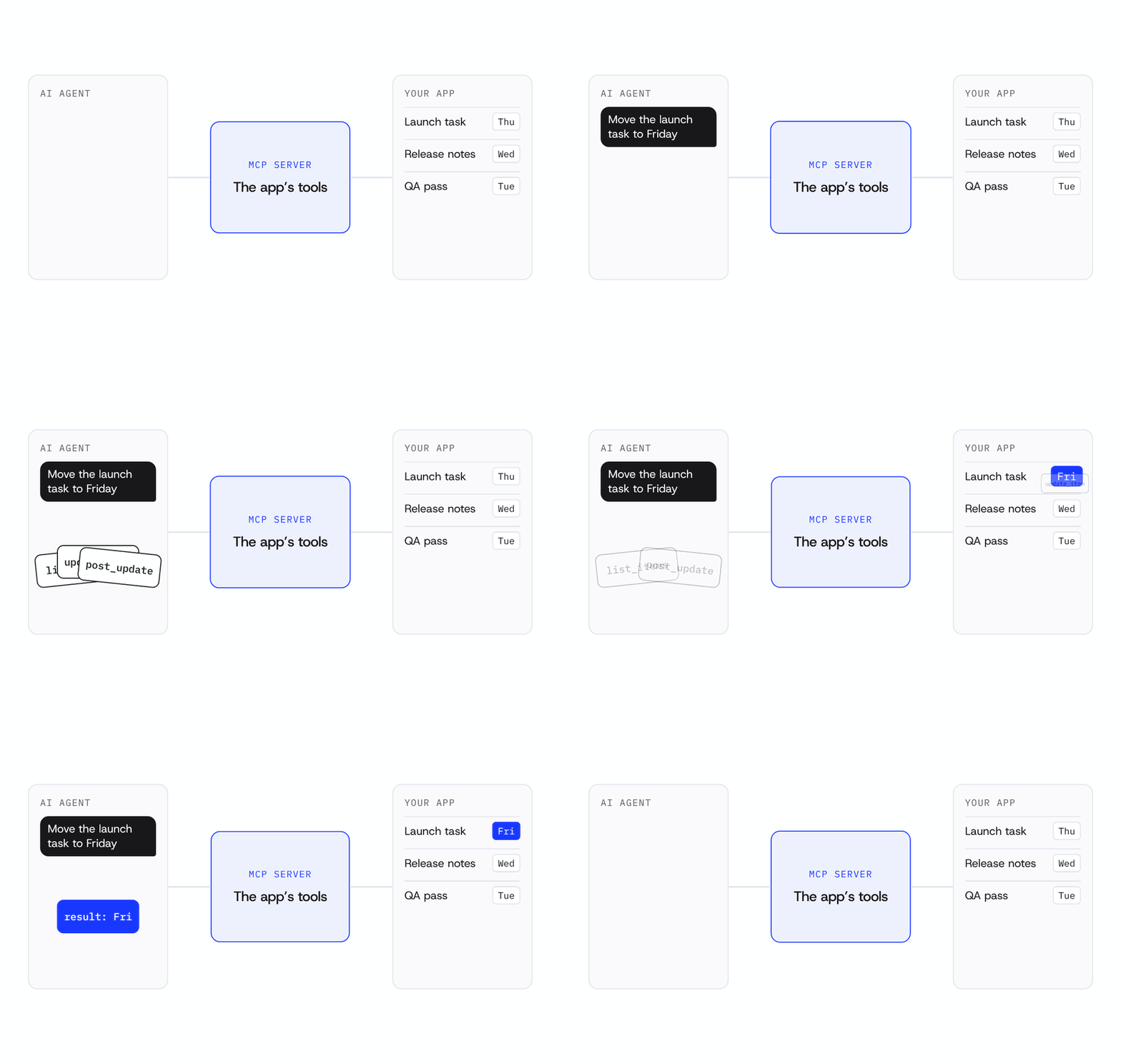
Animation: an AI agent asks to move a launch task to Friday. The MCP server offers the app's tools as cards, the agent picks update_item, the app changes the task from Thursday to Friday, and the result returns to the agent.
TL;DR

An MCP database is a database your AI agent creates and uses through the Model Context Protocol. Connect Claude Code, Cursor, Codex or Copilot to the Codata IO MCP server at mcp.codata.io/mcp and sign in once. Your agent can then plan tables, save data, add login and email, and take the app live.

Your agent can write an app in an afternoon. Then the app needs somewhere to keep users, orders and files. If nobody sets that up before the conversation ends, the data sits in a local file and disappears with the laptop.

An MCP database fixes that. It hands your AI agent a real database it can create, change and use from the chat, over the Model Context Protocol.

This guide covers what MCP is, why a database for AI agents matters and how to connect your agent to Codata IO, step by step. It also covers safety and the other database MCP servers worth knowing.

What is MCP, in one minute

The Model Context Protocol (MCP) is an open standard that lets an AI agent call tools on another service. Think of it as a plug: the agent learns what a service can do, then asks it to do those things.
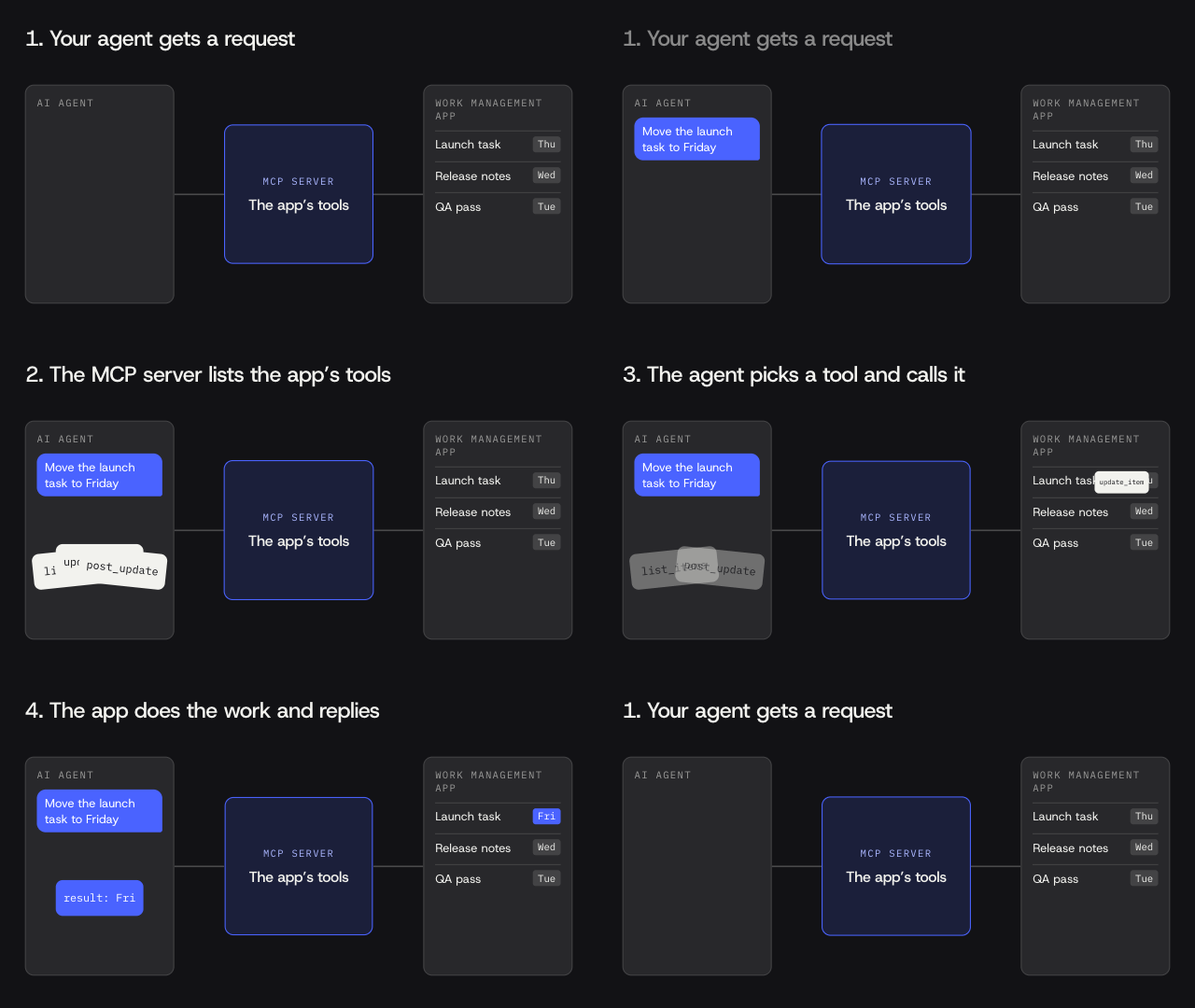
Animation: an AI agent gets a request, the MCP server lists a work management app's tools as cards, the agent calls one, and the app updates and replies.
How MCP works: the agent asks, the MCP server lists the app's tools, the agent calls one, and the app does the work.

Here is a plain example. You tell Claude Code to "change the launch date to Friday" Claude Code calls a tool on the MCP server of your work management app. It finds the related task and updates the date.

An MCP server database setup is that same idea pointed at your data. Servers differ in how much sits behind them: a database only, or also the login, storage and hosting the app needs.

Why your agent needs a real database

Your agent needs a real database because its memory and local files don't last. Each chat starts fresh, and a prototype often keeps data in a JSON file or the browser.
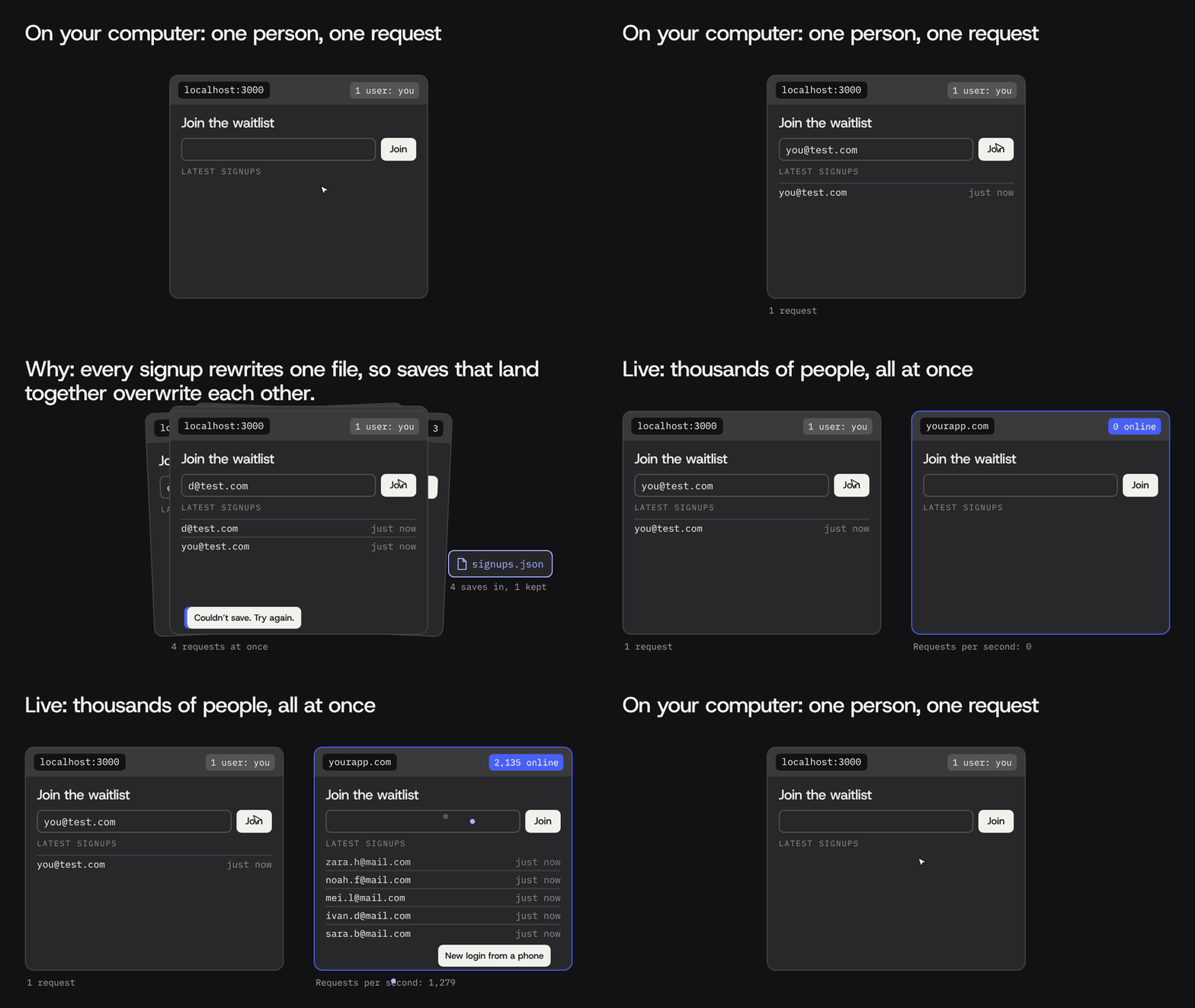
Animation: one person signs up on a localhost prototype and it works. Four signups at once all hit one signups.json file, only one is kept and an error appears. Then the live app handles thousands of people signing up at the same time.
On your computer, one person tests the app at a time. When users try to send a few signups at once, many people experiences that saves get lost. A live app has to handle thousands together.

That works on your machine and nowhere else. A real database gives the app three things a file can't:

  • It outlives the conversation. Users, orders and messages stay put after the agent is done.
  • Many people can use it at once. Two signups in the same second both get saved.
  • It can grow. The agent can add a field or a table next week without losing what's there.

That's the gap between a demo and an app people use. MCP closes it without you copying connection strings around.

What an MCP database gives your agent

An MCP database lets your agent set up and change your data from the chat, without you opening a console. On the Codata IO database, your agent can:

  • Plan tables from a plain request, such as "a signups table with name, email and date."
  • Read and write rows while the app runs.
  • Change the schema as the app grows. The database is auto-planned and auto-migrated, so a new field doesn't mean a manual migration.
  • Try changes on a branch and roll back to an earlier version if one goes wrong.
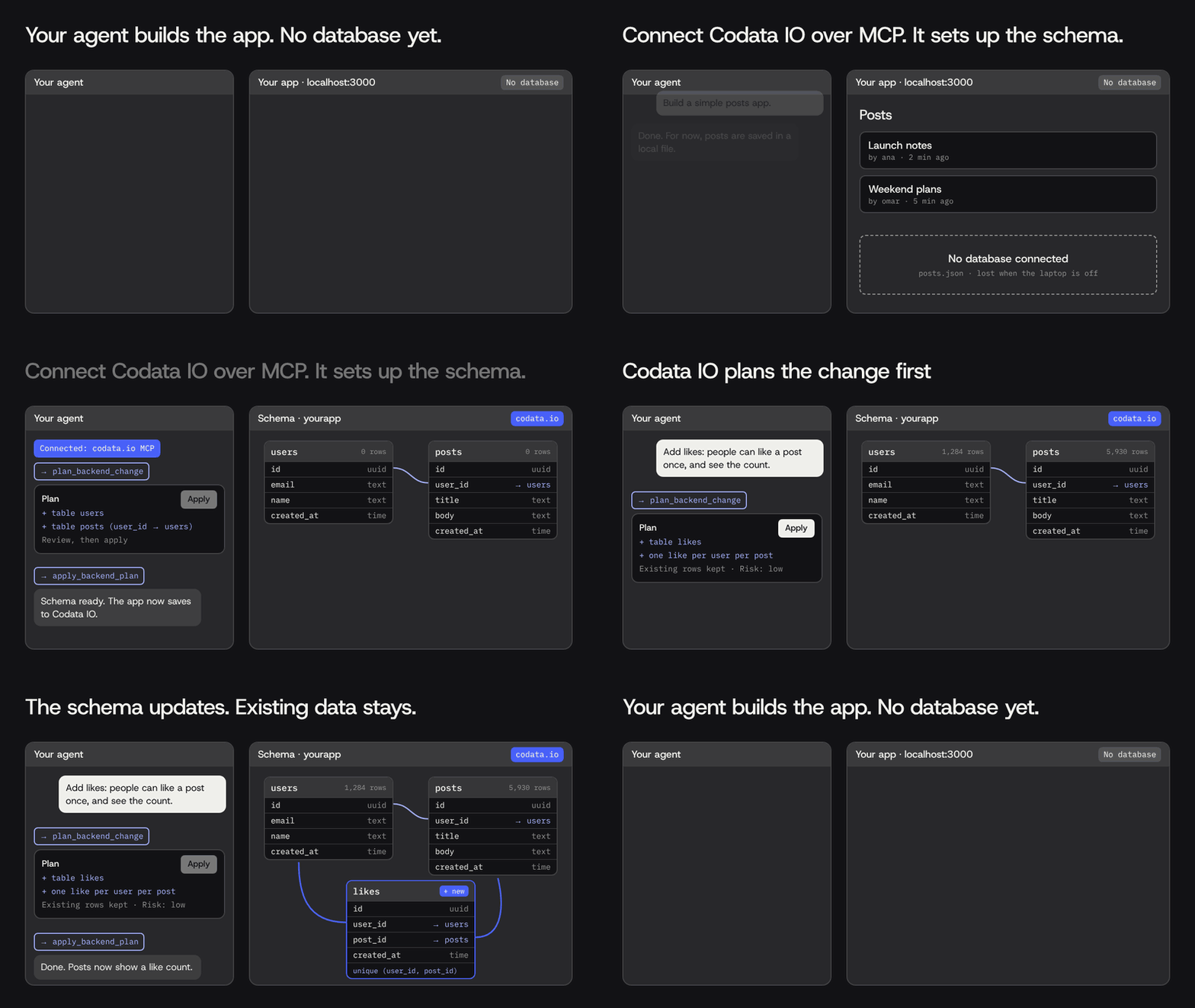
Animation: an agent builds a posts app that has no database, so posts sit in a local file. Codata IO connects over MCP and sets up users and posts tables after a plan is applied. Weeks later the user asks in plain English to add likes; Codata IO plans a new likes table with existing rows kept, and after Apply it appears in the schema, linked to users and posts.
Connect Codata IO and it sets up the schema. Later, ask for a feature in plain English: Codata IO plans the change, you apply it, and the existing data stays.

A database is one part of an app. On Codata IO, the same connection also covers login, file storage, email, hosting and custom domains, so the agent can finish the whole thing. You own the code and the data.

Codata IO doesn't process payments. If your app takes money, connect a payment provider such as Stripe.

Set it up with Codata IO, step by step

You connect your agent to the Codata IO MCP server once, sign in, and then ask for what you want built.

  1. Create a free Codata IO account. The Free plan gives you 2 live apps and $5 of usage one time, with no card.
  2. Add the MCP server to your agent. The address is https://mcp.codata.io/mcp. Use the snippet for your agent below, or run npx @codata-io/cli init. It finds your editor and writes the config for you.
  3. Sign in. The first time your agent uses the server, an OAuth login opens in your browser. Approve it and you're connected.
  4. Point your agent at the Codata skill. Paste: "I'm using Codata as my backend platform. Fetch https://codata.io/skill.md and follow it."
  5. Ask for something real. For example: "Build a waitlist app with a signups table and a confirmation email."
  6. Review the plan, then go live. Codata IO designs the backend and returns a plan showing the changes, the risk and anything that needs your approval. Once it's applied, the agent builds the app and publishes it on a free Codata domain, with email sending from that domain.

Connect Claude Code

Run this in your terminal, then run /mcp inside Claude Code to finish signing in:

claude mcp add --transport http codata https://mcp.codata.io/mcp

To share the setup with your team, add the server to .mcp.json in the project root instead:

{
  "mcpServers": {
    "codata": { "url": "https://mcp.codata.io/mcp" }
  }
}

Connect Cursor

Create .cursor/mcp.json in your project. The sign-in opens the first time Cursor uses the server.

{
  "mcpServers": {
    "codata": { "type": "http", "url": "https://mcp.codata.io/mcp" }
  }
}

Connect Codex

Add the server to ~/.codex/config.toml:

[mcp_servers.codata]
url = "https://mcp.codata.io/mcp"

Copilot in VS Code, Windsurf and Claude Desktop

  • Copilot in VS Code: add the same address to .vscode/mcp.json, or install the Codata for VS Code extension and use @codata in chat.
  • Windsurf: add it to ~/.codeium/windsurf/mcp_config.json as serverUrl.
  • Claude Desktop: open Settings, then Connectors, then Add custom connector, and paste the address.

Full steps for every client are in the MCP setup docs. Bringing your own agent uses no App Builder credits. What the live app consumes, such as database storage, files and emails, counts as usage.

One connection, the whole backend

Agents build the code. Codata IO is where it ships.

Connect your agent, free

Keeping it safe

Letting an agent change your database is safe when sign-in, changes and secrets each have a guardrail. Here is how Codata IO handles them:

  • OAuth 2.1 sign-in. There's no API key to paste into a config file. The agent acts as you, inside your account.
  • Plan first, apply second. Nothing deploys until a plan is applied. If the backend changed after the plan was made, the old plan is rejected instead of applied.
  • Secrets stay out of the chat. When the app needs a third-party key, Codata IO gives you a secure link to enter it. The value never passes through the conversation.
  • Branches and rollback. Try risky changes on a branch, and roll back to an earlier version if something breaks.

Keep your agent's own approval prompts on for changes to live data, too. A quick look at each tool call is cheap insurance.

Other ways to give an agent a database

Several database services run their own MCP servers. Each is a good fit if you already use that database.

MCP serverAddressSign-inVendor guidanceHosting for your app
Codata IOmcp.codata.io/mcpOAuth 2.1Plan, review, then applyYes, free domain plus custom domains
Supabasemcp.supabase.com/mcpOAuthConnect production only when needed; read-only mode and project scopingNo frontend hosting
Neonmcp.neon.tech/mcpOAuth or API keyUse for development and testing, not productionNo
Appwritemcp.appwrite.ioOAuthManages project resources and searches the docsYes, with Appwrite Sites

Sources, checked 11 Oct 2026: Supabase MCP · Neon MCP · Appwrite MCP

SImilar to codata.io, other servers, your agent gets a database it can query and change. But you still own the rest: wiring login and hosting where the service doesn't cover them, connecting a domain and keeping the app up next month. Codata.io handles all that for you through the MCP. For a wider look at other backends, see our guides to Supabase alternatives and Firebase alternatives.

FAQ

What is an MCP database?

An MCP database is a database your AI agent can create and use through an MCP server. The agent calls tools to plan tables, save rows and change the schema, all from the chat. The Codata IO MCP server also covers login, storage, email and hosting for the same app.

Does an MCP database work with Claude Code and Cursor?

Yes. Claude Code, Cursor, Codex, Copilot in VS Code, Windsurf and Claude Desktop all connect to the Codata IO MCP server. Add https://mcp.codata.io/mcp to your agent's MCP config, or run npx @codata-io/cli init, then sign in once in your browser.

Is it safe to let an AI agent change my database?

It is when the guardrails are in place. On Codata IO, sign-in uses OAuth 2.1, changes are planned before they're applied, secrets go through a secure link instead of the chat, and branches and rollback let you undo a change. Keep your agent's approval prompts on for live data.

Does connecting my own agent cost App Builder credits?

No. Bringing your own agent, such as Claude Code, Cursor, Codex or Copilot, uses no App Builder credits. Credits apply only when you build with Codata App Builder. What your live app consumes counts as usage, and the Free plan includes $5 of usage one time.

What happens to my app when the chat ends?

It keeps running. Your agent publishes the app on Codata IO, and Codata IO keeps the database, login and hosting alive after the conversation closes. On the Free plan, the app pauses once its $5 of usage runs out. Paid plans include usage every month.

The bottom line

An MCP database turns your agent from a code writer into something that ships a working app. Supabase, Neon and Appwrite all run solid MCP servers if you already use their products.

If you want your agent to set up the whole backend and keep the app alive after the chat, connect it to Codata IO. The conversation ends. Your app doesn't.

Start free

Connect your agent to the agentic cloud. Free, no card.

One MCP address gives your agent a database, login, storage, email and hosting that stay live.

Start for freeConnect your agent
Related reading
Blog Best Supabase alternatives in 2026 Seven options compared on free tier, self-hosting and agent support. Compare Firebase alternatives for AI builders Where Firebase fits, and what to use when it doesn't. Answers How schema migrations work with agents What happens when your agent changes the data model.